
**** Please complete all previous Assignments before moving to this assignment ****
**** You can do this assignment in teams of 2, but each person must do their own mix and re-mix *****
Preliminary Steps:
• Connect a mic to Ch. 5. Connect the Main OUTPUTS to the FRONT LR speakers on the patchbay. Connect the JBL monitor to Aux 2.
• Set the MAIN LR fader to -20, and send the mic to the speakers.
MONITOR SEND
(If unsure, bring all the faders down; as you do the various steps, bring them back up slowly to avoid feedback)
• Send the mic to the monitor as a Pre-Fader send on AUX 2. Change to Post-Fader.
• Try the MUTE button.
Q1 does Pre or Post fader make a difference on the mute?
FX SEND
• With one TRS cable, connect the AUX send 4 on the Mackie to the "REVERB IN" on the patchbay. Then, connect two other TRS cables to the "REVERB OUT LR" on the patchbay. These last two cables are the FX RETURNS from the reverb unit.
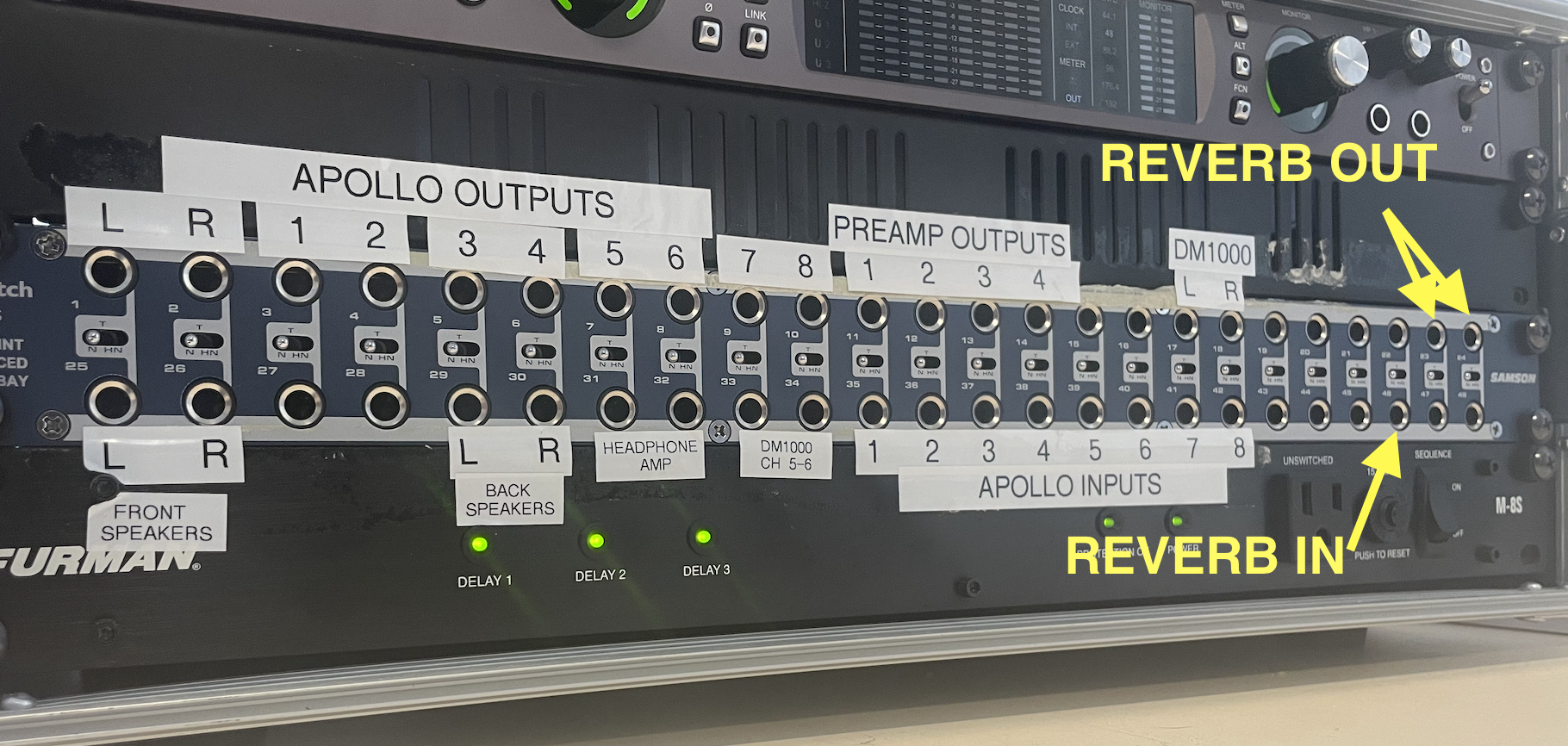
• Make sure the reverb unit has the following settings. Feel free to play around and choose any effect preset (however, reverbs and delays will work best here).

• Connect the other end of the RETURN cables in the following three ways:
1) on two mono channels (check the panning)
2) on a stereo channel
Q2 What would happen if you turn up the AUX 4 dial on this stereo channel? Try, but go VERY slowly.
3) on the FX return 1
For each connection method, do the following:
• send the mic to the reverb unit.
• send the output of the reverb unit to the Mains.
• send the reverb to the monitor
Q3 Which of the above three connections allows to EQ the reverb?
Q4 Which of the above three connections DOES NOT allow to EQ the reverb?
Part 1 - Mix
• Reset the mixer (i.e., bring all the faders down, adjust all the GAINS to "u" (i.e, around 11 o'clock for Ch1-8).
• On the Mackie, raise MAIN LR fader to "-20".
• Connect the TRS snake to the LINE INs of ch.1-8 on the Mackie, following this color order: red, orange, yellow, green, blue, white, grey, black.
Q5 In this case, why should the gains be set to "u"?
This will correspond to the following instruments:
1-kick
2-snare
3-OH L
4-OH R
5-bass
6-guitar
7-piano
8-voice
• Connect the other end of the TRS snake to the Apollo OUTS L-R-1-2-3-4-5-6 on the patchbay, following the same color order as above: red, orange, yellow, green, blue, white, grey, black.
• On the iMac, open the "Angela Thomas Wade - Milk Cow Blues_8Tracks-2024" Logic session on the 618 computer, which is located: Desktop>Student Work>2024 2025>Advanced Electronic Music>Class Materials.
**DO NOT ALTER THIS FILE** Do not save when you quit.
• Hit play in Logic. You should see the green lights on ch. 1-8 of the Mackie, showing that signal is reaching these channels. Slowly raise the faders to Ch1 to Ch8. You should hear the various instruments on the speakers.
NOTE: If there's no sound coming from Logic, quit Logic, turn off the Apollo X8 interface, wait 5 secs, and turn it back on, then re-open Logic.
• Create a sub-group of the drum channels: on ch.1-4, UN-select LR as the destination output, and select 1-2 instead. Pan ch.1-4 as appropriate. On the master, press the L and R buttons for faders 1 and 2 respectively, then raise the fader to "u". These faders now control the level of the entire drum set.
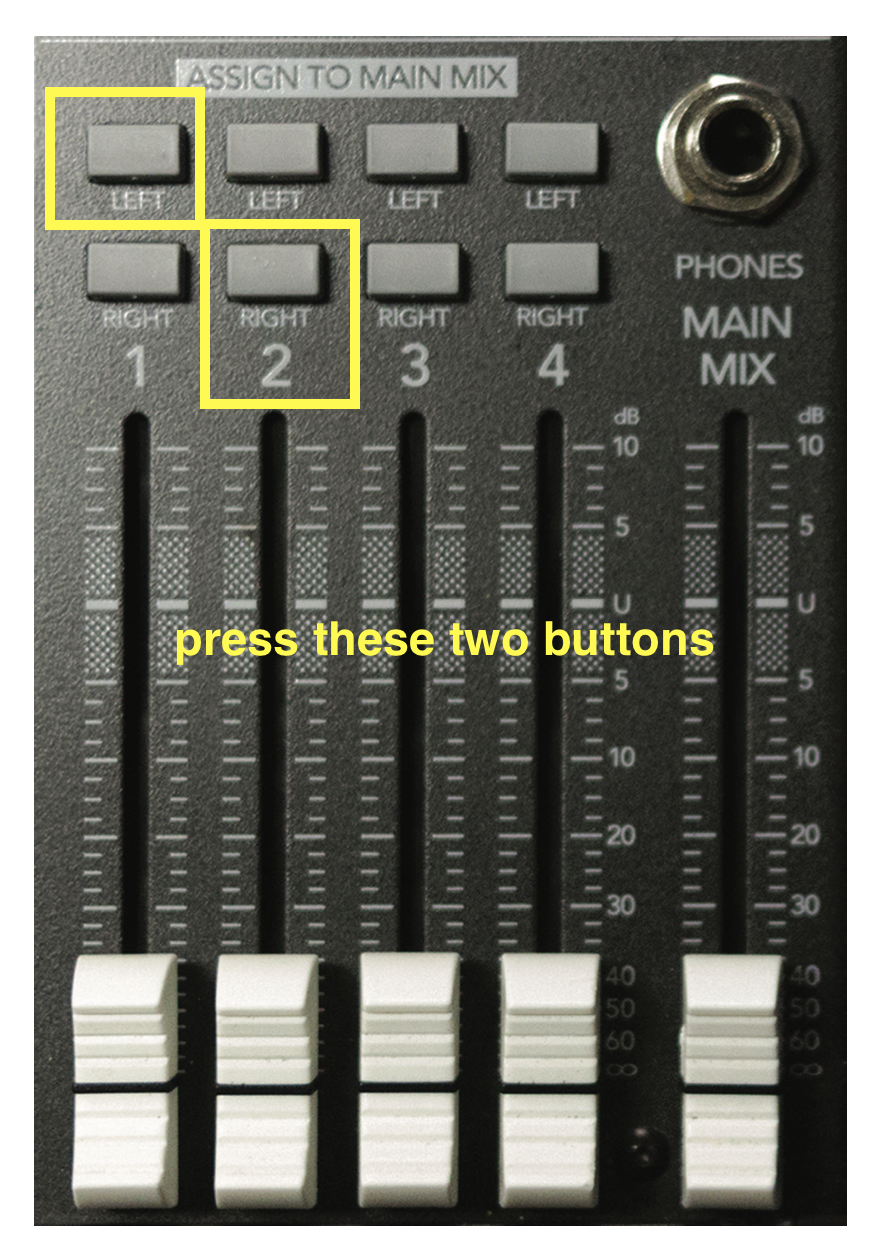
• Practice mixing the entire song using the Mackie mixer (i.e., do no use any plugins in Logic). While doin so, do the following:
1) add reverb to the voice track.
2) send the voice and guitar to the JBL monitor.
3) add reverb to the voice on the monitor (but not on the guitar).
Q6 is it possible to have reverb on the voice and guitar in the MAIN mix, but only on the voice in the JBL monitor?
4) listen each instrument individually on the headphones (remember that you must press the MAIN LR as the source for the headphones).
• Once satisfied with your mix, record with your phone a short 20sec video of the mixer while Logic is playing. No need to send me this video; simply transfer it to your student folder on the class iMac (Desktop>Student Work>2025 2026>Advanced Electronic Music>Create a folder here with your name).
Lastly…
• Disconnect the cables from the patchbay, power off the mixer, and disconnect all XLR cables. DO NOT save Logic, and quit. Coil all the cables and leave everything in the black bin, as tidy as possible for the next student.