
Please complete all previous assignment before starting this assignment.
The following task is to build a generative patch on the modular synth. Generative synth patches randomly create pitch and rhythms to produce a self-composing, endless musical texture. Here, we will be imitating what's known as a "Krell" patch, which is a patch first created by Todd Barton in 2021 to imitate the music of the Krell's from the music Forbidden Planet. This patch has become somewhat famous in modular synth circles because of its relation to the pioneering work of Louis and Bebe Barons, the electronic music composers of the Film's score. Here's a sample of the music from the film:
Here a sample of the Krell patch by Todd Baron:
As before, you're essentially going to be re-doing what we did in class. For each step, make sure you understand how each dial is changing the sound, and take note of any questions I can answer in class next week.
If you want more info on each module, please see this 618 Resources site, and scroll down to "All 618 Synthesizer Manuals".
Please refer to the Synthesis Notes shown in class.
In addition, I'm making available a VCV version of the 618 modular synth, if you're interested in working at home to try out various ideas before working in 618. VCV is a FREE software modular synth, which is great for learning. Please see email about the 618 VCV for more info.
Getting Started
1) Make sure the "Modular" faders on the Yamaha mixer are down, then power-on the Modular (black button, top left), then bring the Yamaha faders up to "0".
2) Reset the modular. There are too many things to reset, so you just need to make sure that the CURVE knobs at the top of the CLOAKS module are all the way to the right, and that the OFFSET knobs (just below the CURVE knobs) are all the way to the left.
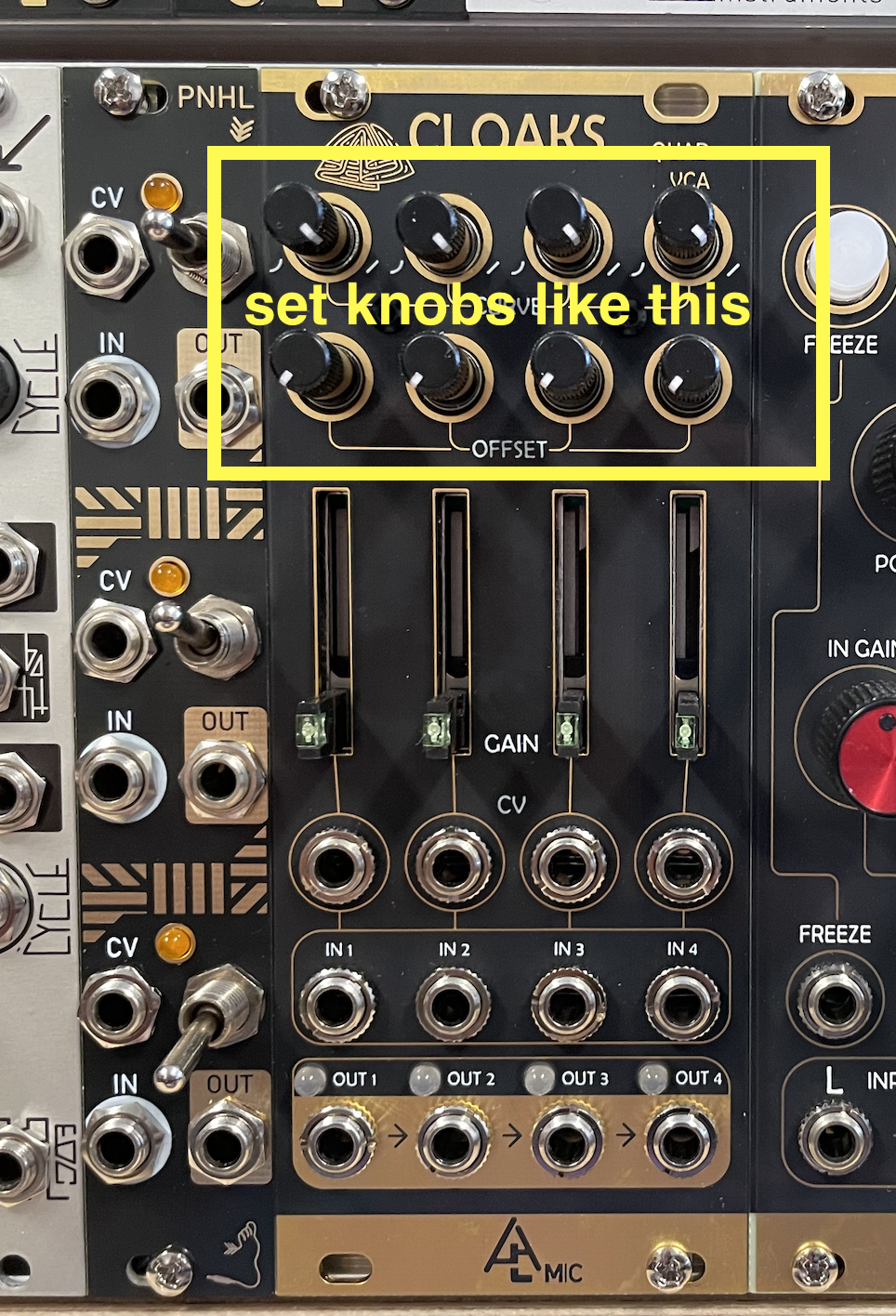
3) Turn up the HEADPHONE volume on the modular to about 12' o'clock.
Krell Patch
NOTE: Click on any image below; it will open in a new tab. Toggle between tabs to look at the patch and follow the instructions.
Generative patches essentially have to accomplish two things: random pitches and rhythms, which, hopefully, will be interesting musically. In our version of the Krell patch, a looping envelope from MATHS triggers random pitches and note durations at the end of each loop. Here's a breakdown of the patch and process:
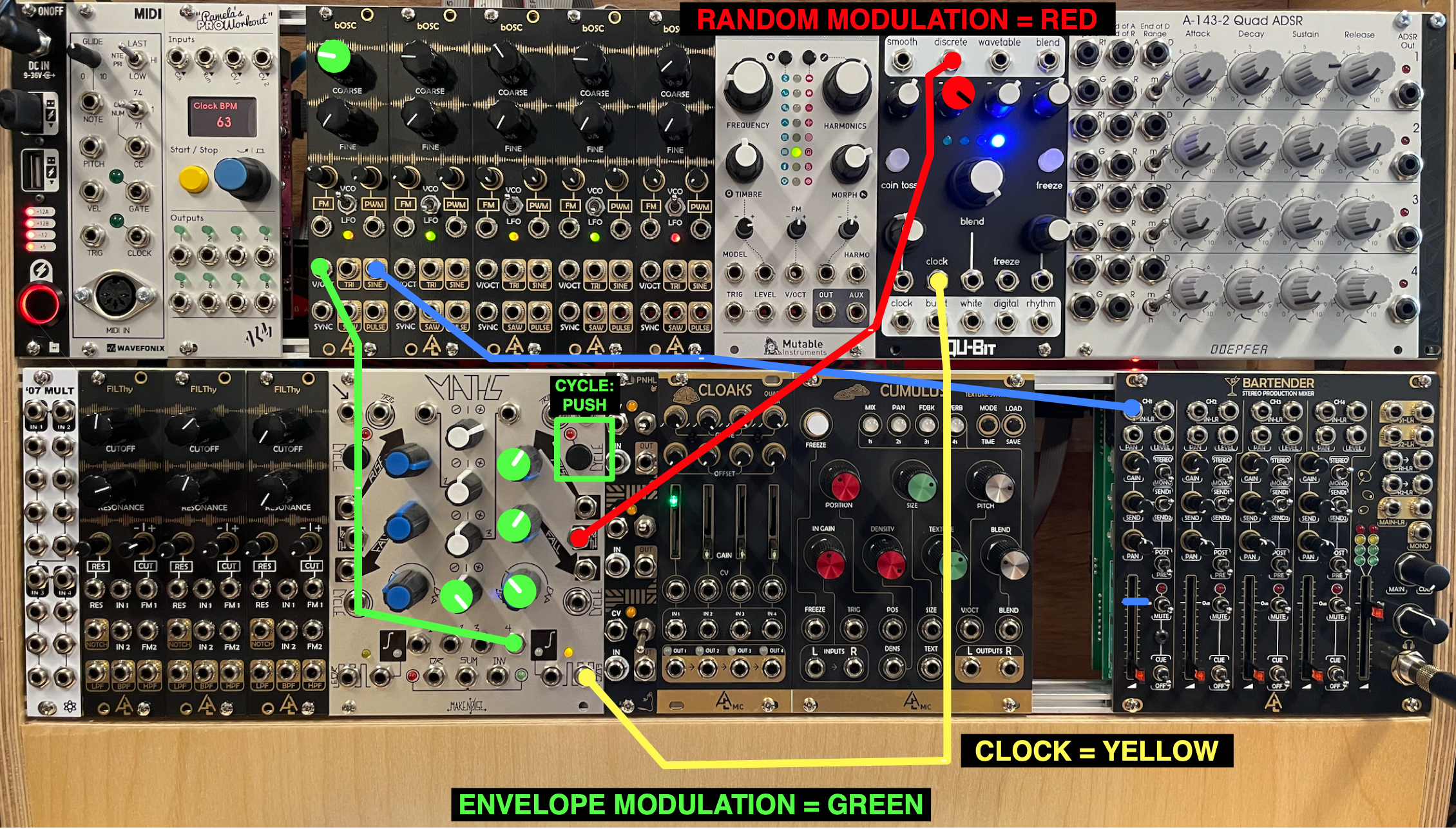
1) Set the right envelope of MATHS to CYCLE, and set the RISE and FALL as per the GREEN knobs on the image. Now, TEMPORARILY, just to hear the envelope, connect OUT4 of MATHS to the V/OCT input of the first bOSC, and connect the SINE output of the bOSC to the IN1 of the MIXER. Raise the CH1 fader of the MIXER. You will hear a sine tone going up and down in a loop.
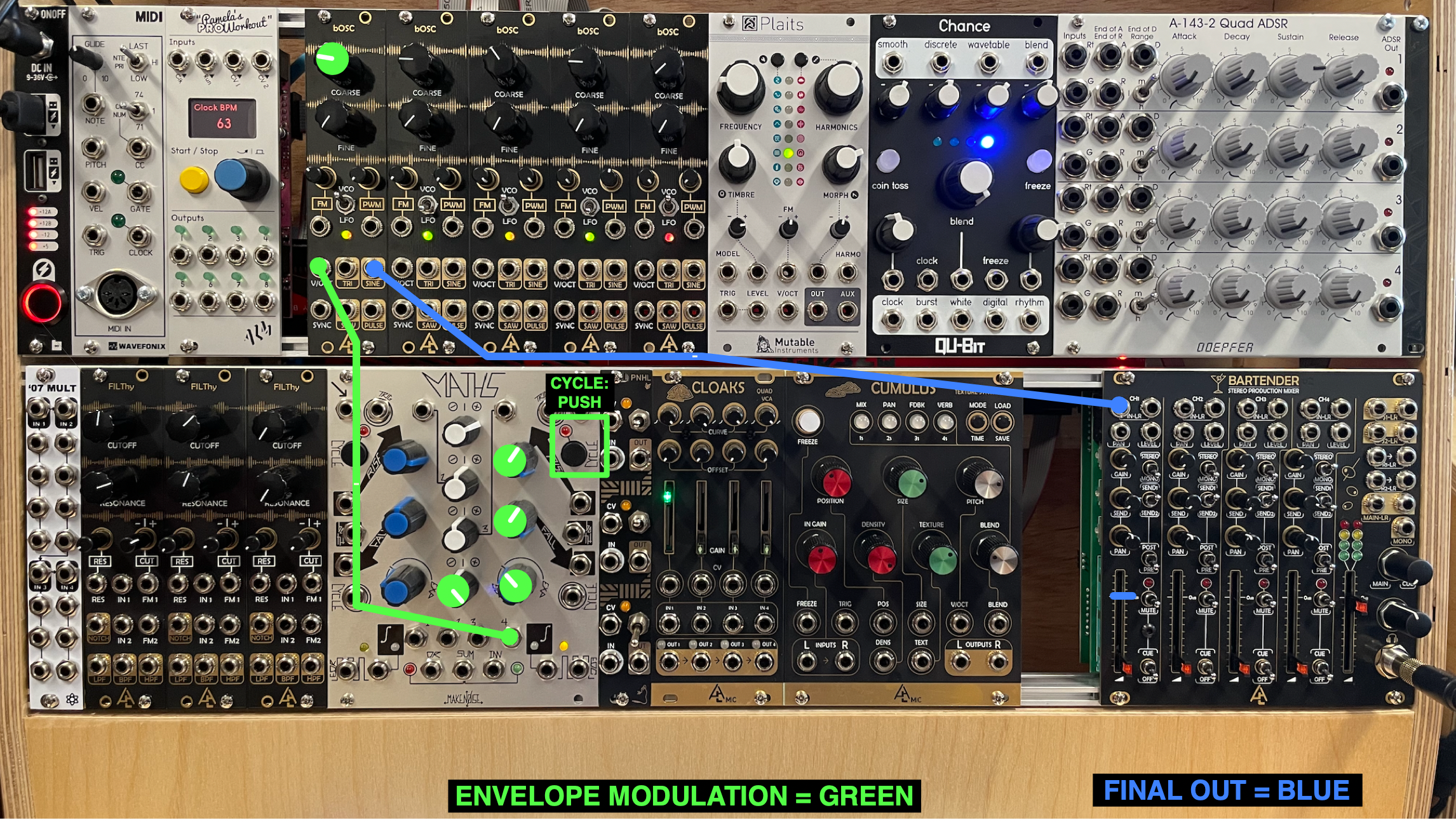
What's going on: the looping envelope from MATHS is controlling the pitch of the sine tone. Try pressing the CYCLE again; the envelope will stop looping. Press CYCLE again to turn the looping back on.
2) Connect the EOC output of MATHS to the CLOCK input of CHANCE. Notice that at the end of each envelope cycle, the COIN TOSS button on CHANCE lights up.
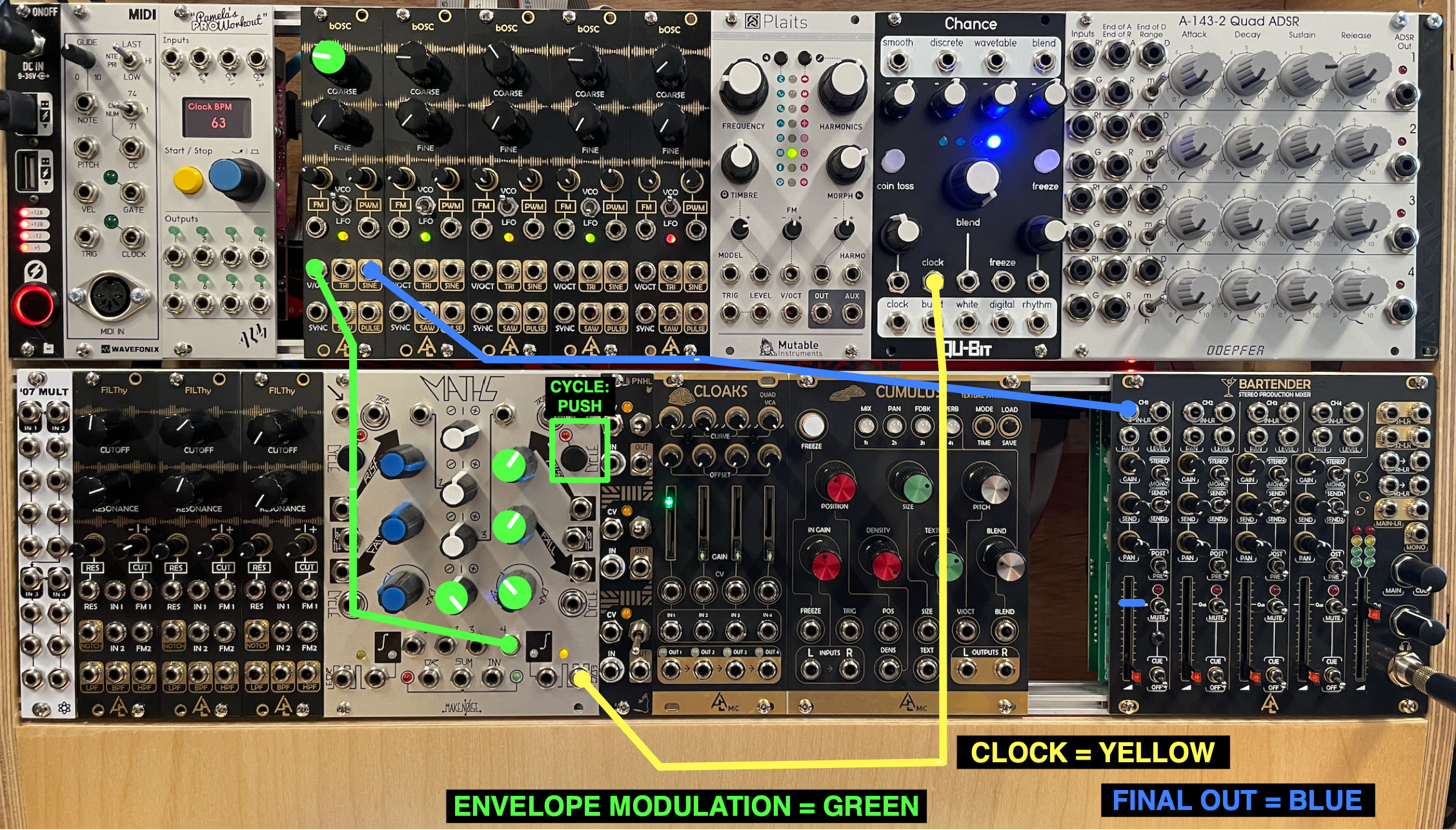
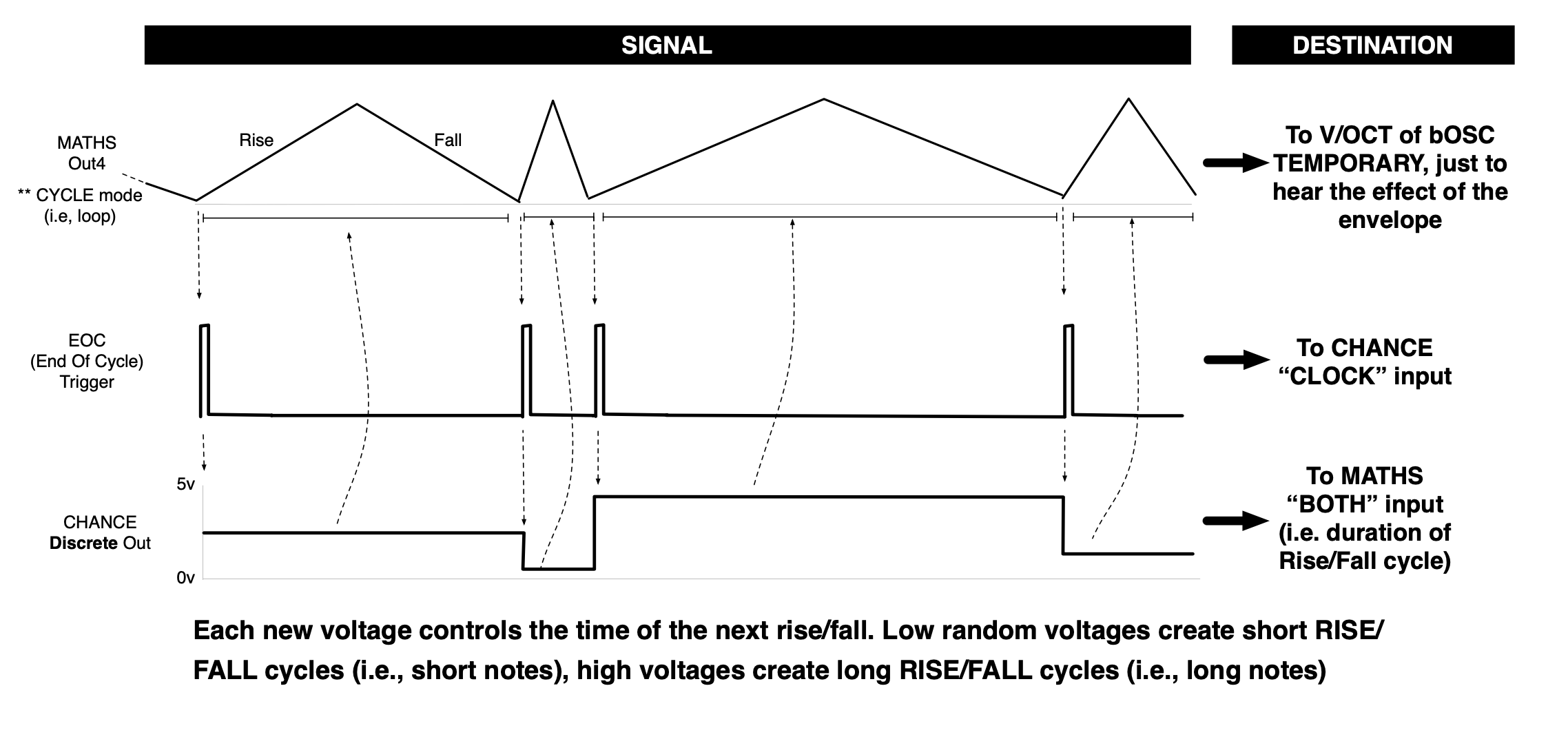
What's going on: At the end of each envelope cycle, MATHS outputs from the EOC (=END OF CYCLE) a pulse, which CHANCE then interprets as a CLOCK.
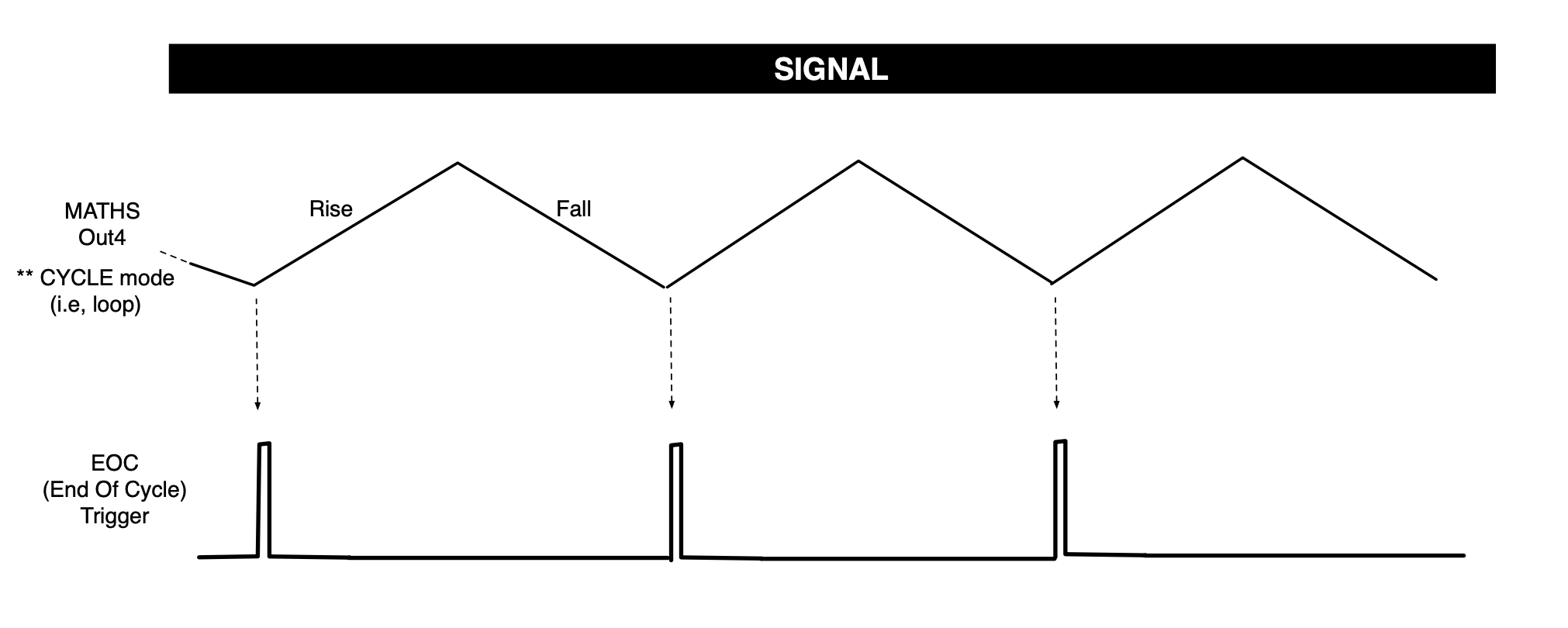
3) Connect the DISCRETE output of CHANCE to the BOTH input of MATHS. Each loop will now have a different duration.
What's going on: Each time CHANCE receives a clock trigger from MATHS, it outputs a new set of random values from all of the top outputs. Here, the DISCRETE output, which produces stepped voltages, modulates the RISE and FALL times via the BOTH input. When BOTH receives a low voltage, it produces short RISE and FALL; and when BOTH receives a high voltage, it produces long RISE and FALL times:
4) Let's now create the random pitches.
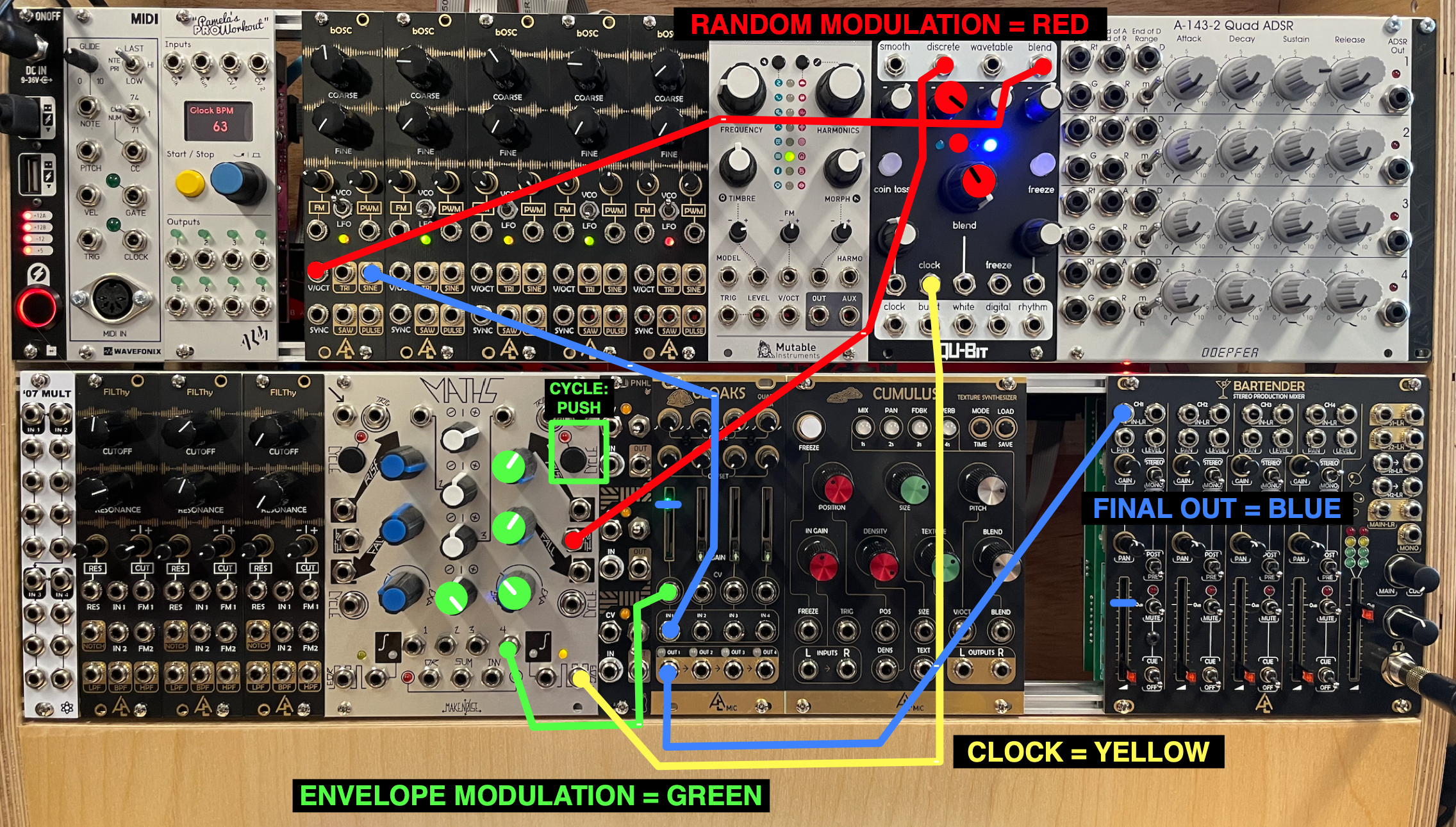
• Disconnect the V/OCT cable from the first bOSC, and reconnect it to the CV1 input of CLOAKS. From this point on, the envelope from MATHS will control the VOLUME of the sound, not the pitches.
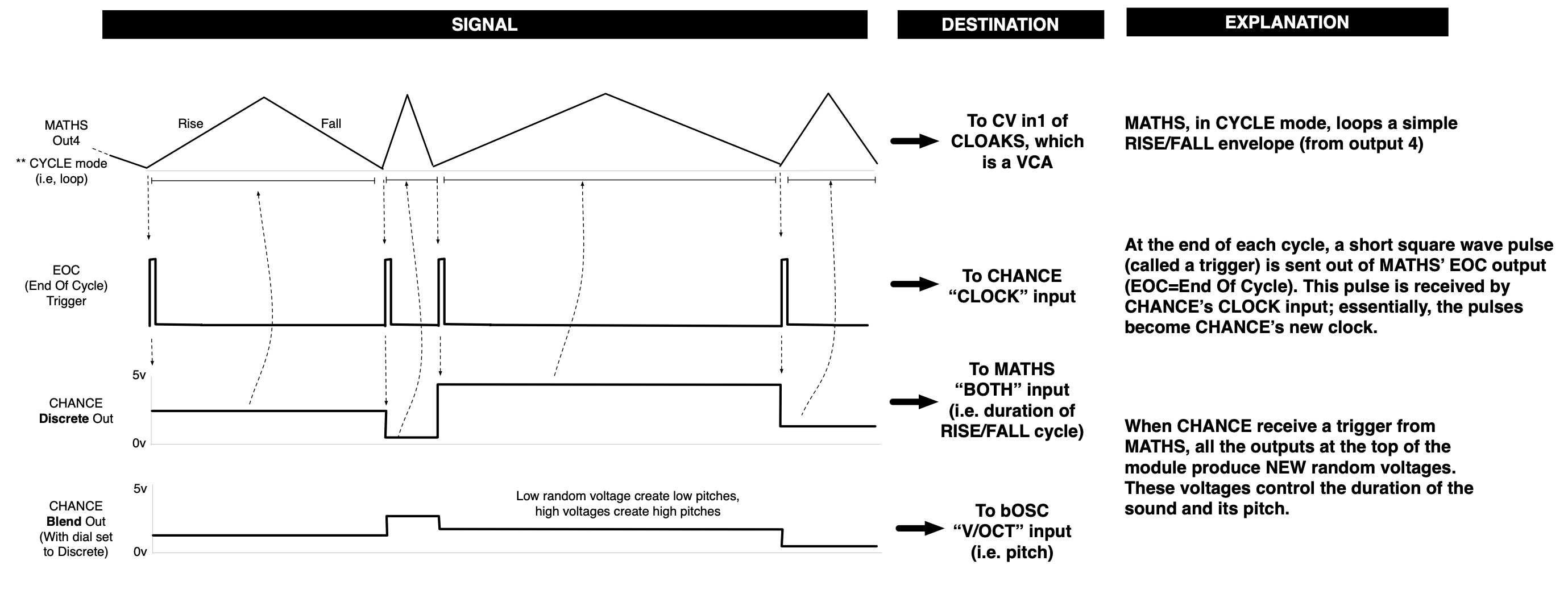
Remember: CLOAKS is a VCA (Voltage Controlled Amplifier), which means that it applies any type of signal connected to a CV input (i.e., Control Voltage input) to the AMPLITUDE (i.e., volume) of a signal connected to the INPUT.
• Connect the SINE output of the first bOSC to the IN1 of CLOAKS.
• Connect the OUT1 of CLAOKS to the IN1 of the MIXER.
• Connect the BLEND output of CHANCE to the V/OCT input of the first bOSC, and set the BLEND knob so that only the second light appears.
• You should now hear random pitches with random durations: that's it, a very basic Krell patch!
What's going on: The BLEND output of CHANCE outputs a mix of the SMOOTH, DISCRETE, and WAVETABLE outputs, as set by the BLEND knob. By placing the blend knob to only the second light, we're effectively creating a second DISCRETE output, which we will use to control the pitch of the sound.
5) From this point on, one can do any modifications to the patch to change the sound. Try the version in the image below, which replaces the bOSC with PLAITS and a bunch of modulation.
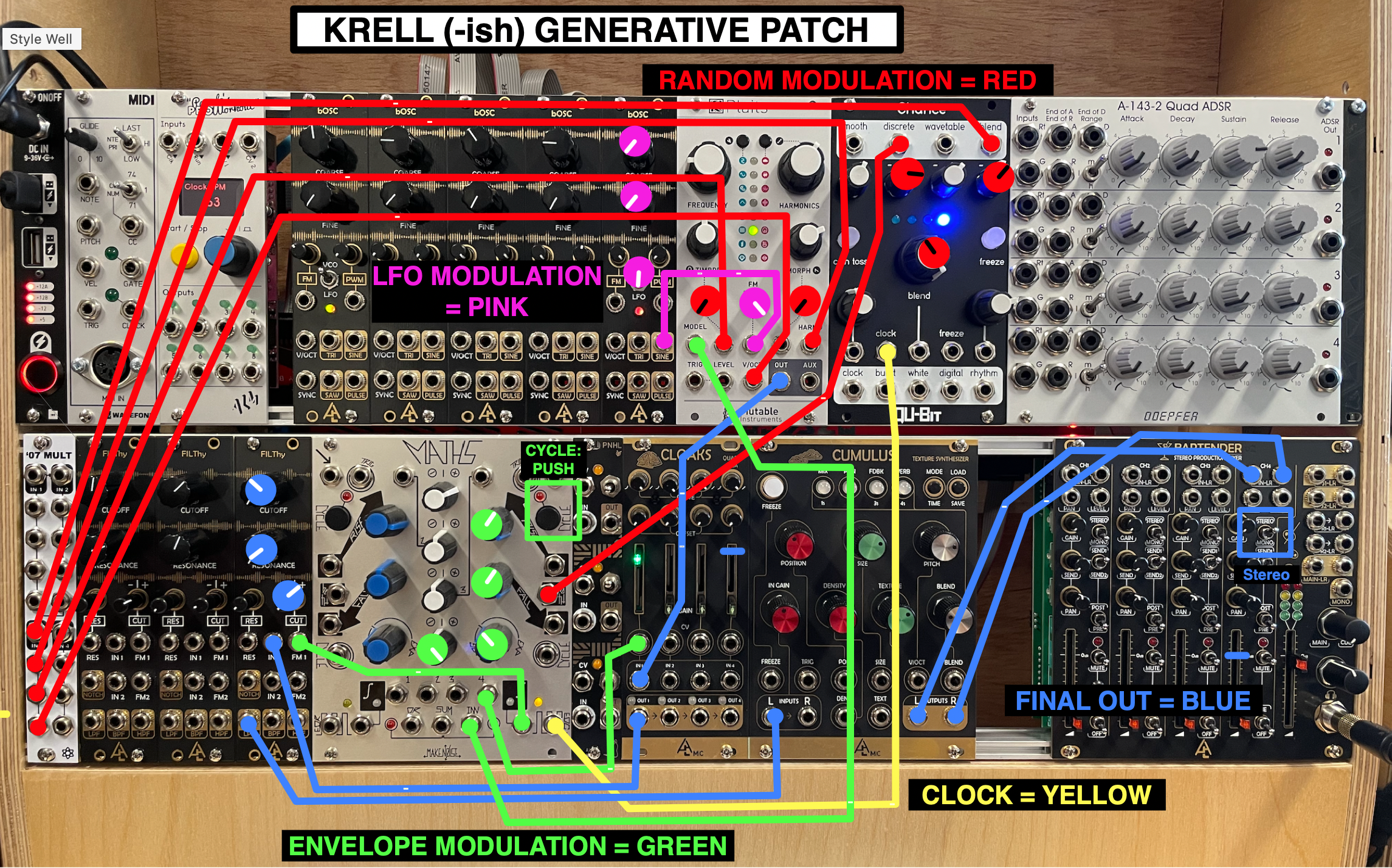
Q1: In the patch above, what knob(s) do you have to turn in order to get a vibrato effect (like a singer's vibrato, where the pitch slightly varies up and down)?
Q2: In the patch above, what is effect of turning the DISCRETE knob all the way to the right versus just a little to the right from the center? Why?
Q3: In the patch above, can you explain what the INV output of MATHS is doing, and how it's changing the MODEL in PLAITS?
Experimentation
• MUTE THE APOLLO (press the MONITOR knob, it will turn red). VERY IMPORTANT!! You will get feedback if you don't do this.
• Then, open Logic on the iMac, create a track with INPUT 7-8, and click record enable.
• Hit record.
• Experiment by playing around with any knob or connection. As always, this is an instrument, meant to be played; turn those knobs!
• Have fun, and do not fear mistakes.
Finally…
• Save your Logic project.
• Turn down the faders on the YAMAHA mixer.
• Turn down the headphone volume on the modular.
• Remove all patch cables and place them on the table in front of the modular.